





From Zoom Fatigue to Engagement Gold: 5 Interactive Tools That Transform Virtual Sessions
Review of platforms that make online coaching sessions more dynamic and effective
The virtual revolution promised connection without boundaries, yet here we are – staring at another grid of muted faces, watching engagement levels plummet faster than a dropped video call. If you're a coach, consultant, speaker, or course creator who's felt the soul-crushing weight of virtual session fatigue, you're not alone.
The good news? The solution isn't going back to in-person only – it's evolving beyond the basic video call.
Virtual sessions don't have to be energy drains. With the right interactive tools, you can transform your online coaching sessions, workshops, and courses into dynamic experiences that participants actually look forward to.
This comprehensive review explores eight game-changing platforms that are revolutionizing how we connect, engage, and deliver value in virtual spaces.

The Real Cost of Disengaged Virtual Sessions
Before diving into solutions, let's acknowledge the elephant in the virtual room. Research from Stanford University coined the term "Zoom fatigue" for good reason – prolonged video conferencing leads to increased tiredness, anxiety, and decreased cognitive performance. For coaches and consultants, this translates directly to:
Reduced client outcomes: Disengaged participants absorb less information and implement fewer strategies
Lower retention rates: Clients are more likely to discontinue services when sessions feel draining
Decreased referrals: Lackluster experiences don't generate the word-of-mouth marketing your business needs
Professional burnout: Facilitating lifeless sessions is exhausting for practitioners too
The solution isn't abandoning virtual delivery – it's upgrading your toolkit. The platforms reviewed below address the core issues behind virtual fatigue: lack of interaction, passive consumption, and limited sensory engagement.
1. Mentimeter: The Instant Engagement Amplifier
Best For: Real-time polling, Q&A sessions, and live feedback collection
Mentimeter transforms one-way presentations into interactive conversations through live polls, word clouds, and Q&A features. Participants use their smartphones to respond, creating immediate visual feedback that energizes the entire session.
Key Features:
Live polling with instant results visualization
Word cloud generation from audience responses
Anonymous Q&A submission and voting
Quiz functionality with gamification elements
Integration with PowerPoint and Google Slides
Pricing: Free tier available; Premium plans from $4.99/month
Real-World Application: During a leadership coaching workshop, use Mentimeter to gauge current leadership challenges through a word cloud. As responses populate in real-time, you instantly see patterns and can tailor your content to address the most pressing issues. This beats asking "Does anyone have questions?" to a silent room.
Pros:
Incredibly user-friendly for both facilitators and participants
Works on any device with internet access
Beautiful, professional visualizations
Strong analytics for post-session insights
Cons:
Limited customization in free version
Can become repetitive if overused
Requires stable internet for optimal performance
2. Kahoot!: Gamification That Actually Works
Best For: Learning reinforcement, team building, and injecting fun into serious topics
Kahoot! turns knowledge sharing into competitive gaming experiences. This platform is particularly powerful for course creators and corporate trainers who need to ensure information retention while maintaining high energy levels.
Key Features:
Multiple-choice quiz games with music and timers
Team collaboration modes
Customizable avatars and themes
Detailed performance analytics
Content library with millions of ready-made games
Pricing: Free basic version; Premium plans from $3.95/month
Real-World Application: After teaching a module on financial planning strategies, launch a Kahoot! quiz to reinforce key concepts. The competitive element keeps participants alert while the immediate feedback helps identify knowledge gaps that need addressing.
Pros:
High engagement through gamification
Excellent for knowledge retention testing
Easy to create custom content
Works well with large groups
Cons:
Can appear unprofessional in formal settings
Limited to multiple-choice format
May be distracting if not used strategically
3. Miro: Digital Collaboration Redefined
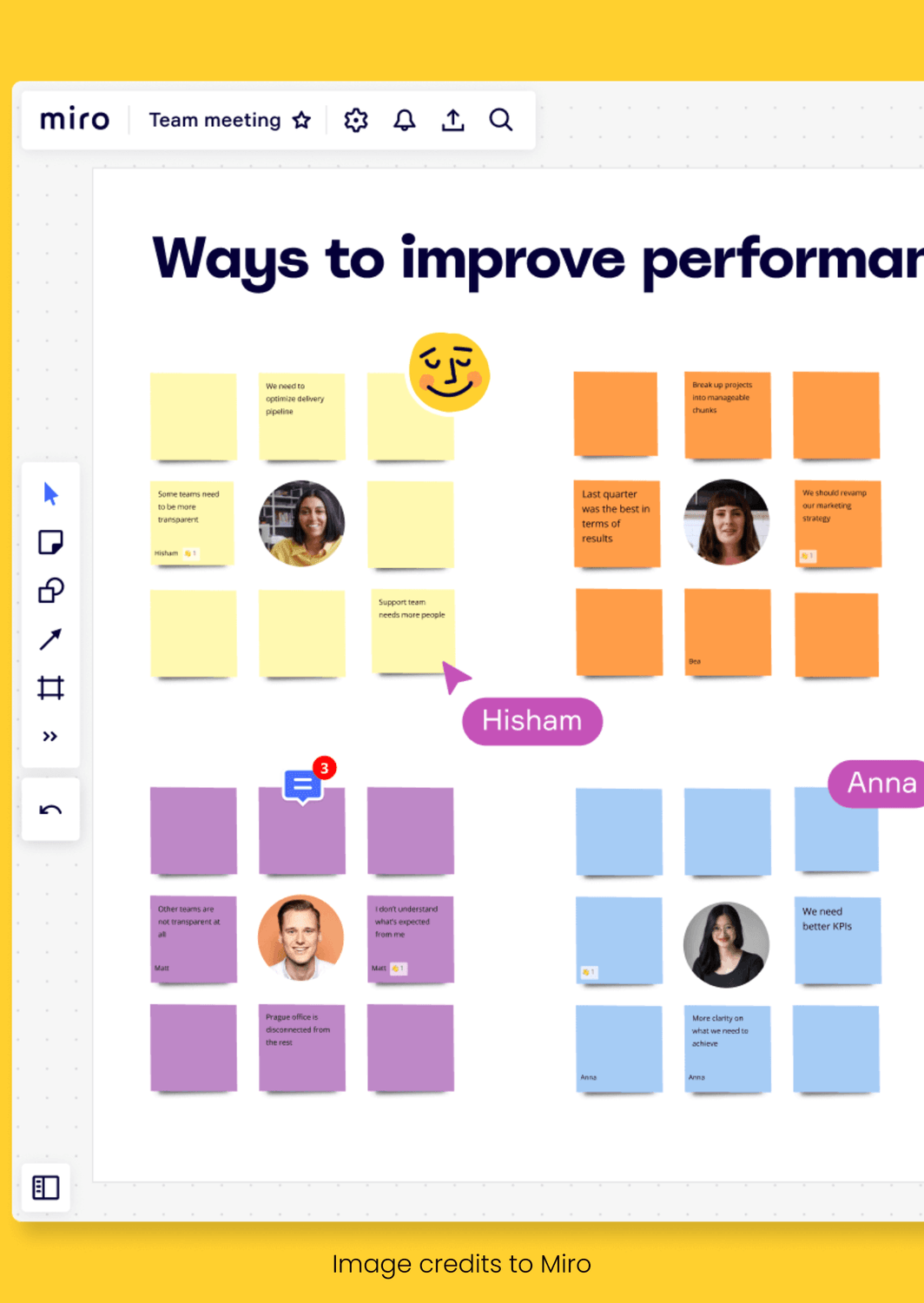
Best For: Visual collaboration, brainstorming sessions, and complex problem-solving
Miro provides an infinite digital whiteboard where participants can collaborate visually in real-time.
For coaches working on strategic planning or consultants facilitating innovation sessions, Miro bridges the gap between physical and virtual
collaboration.
Key Features:
Infinite canvas with sticky notes, drawings, and templates
Real-time collaboration with cursor tracking
Video chat integration within boards
Extensive template library for various use cases
Integration with major productivity tools
Pricing: Free tier for up to 3 boards; Paid plans from $8/month per user
Real-World Application: During a business strategy session, create a customer journey mapping exercise where participants add sticky notes, draw connections, and identify pain points collaboratively. Everyone can see changes happening in real-time, maintaining the energy of in-person brainstorming.
Pros:
Replicates physical whiteboard experience
Excellent for visual learners and collaborative work
Robust template library saves preparation time
Strong export and sharing capabilities
Cons:
Steep learning curve for complex features
Can become overwhelming with large groups
Requires good internet bandwidth for smooth operation
4. Slido: The Professional's Choice for Audience Interaction
Best For: Large-scale presentations, conference sessions, and formal training environments
Slido excels in professional environments where engagement needs to feel polished and seamless.
It's the go-to choice for speakers and trainers who present to large audiences and need sophisticated interaction management.
Key Features:
Live polling with multiple question types
Anonymous Q&A with moderation capabilities
Word clouds and ranking exercises
Integration with PowerPoint, Google Slides, and major video platforms
Detailed analytics and reporting
Pricing: Free for up to 100 participants; Premium plans from $12.95/month
Real-World Application: During a keynote presentation on leadership trends, use Slido to collect anonymous questions throughout your talk. Address the most voted questions during designated Q&A segments, ensuring you're covering what the audience actually wants to know.
Pros:
Professional appearance and reliable performance
Excellent moderation tools for large audiences
Strong integration capabilities
Comprehensive analytics package
Cons:
Less gamification compared to other platforms
Can feel impersonal in small group settings
Advanced features require paid subscription
5. Padlet: Collaborative Content Creation Made Simple
Best For: Ongoing collaboration, resource sharing, and community building
Padlet creates digital walls where participants can post text, images, videos, and links. It's particularly valuable for coaches running group programs where ongoing collaboration and resource sharing enhance the experience.
Key Features:
Multiple layout options (wall, stream, grid, map, timeline)
Multimedia content support
Real-time collaboration and commenting
Privacy controls and moderation tools
Mobile app for on-the-go participation
Pricing: Free tier with limitations; Premium plans from $12/month
Real-World Application: Create a "Success Stories" Padlet where coaching clients share their wins throughout your program. This builds community, provides social proof, and maintains engagement between sessions.
Pros:
Intuitive interface requiring minimal training
Flexible layout options for different use cases
Strong mobile experience
Excellent for asynchronous collaboration
Cons:
Limited formatting options in free version
Can become cluttered with large groups
Basic analytics compared to specialized tools
Strategic Implementation: Maximizing Tool Effectiveness
Simply adding these tools to your virtual sessions won't automatically solve engagement issues. Strategic implementation is crucial for success:
Pre-Session Preparation
Test thoroughly: Always run through your interactive elements before the actual session
Prepare backups: Have low-tech alternatives ready in case of technical issues
Set expectations: Brief participants on how they'll be interacting during the session
During the Session
Start small: Begin with simple interactions to build comfort and confidence
Vary your approach: Mix different types of engagement throughout longer sessions
Monitor energy: Watch for fatigue and adjust interaction frequency accordingly
Post-Session Follow-up
Analyze data: Review engagement metrics to improve future sessions
Continue conversations: Use platforms like Padlet or Flipgrid for ongoing engagement
Gather feedback: Ask participants which interactive elements were most valuable
Measuring Success: Key Performance Indicators
Track these metrics to quantify the impact of your interactive tools:
Participation rates: Percentage of attendees actively engaging with interactive elements
Session completion rates: How many participants stay for the entire session
Follow-up engagement: Continued interaction after the session ends
Client satisfaction scores: Formal feedback on session experience
Business outcomes: Retention rates, referrals, and program completion rates
The Future of Virtual Engagements
The platforms reviewed here represent the current state of virtual engagement technology, but innovation continues rapidly. Emerging trends include:
AI-powered personalization: Tools that adapt interaction style to individual preferences
Virtual and augmented reality integration: More immersive collaboration experiences
Advanced analytics: Deeper insights into engagement patterns and learning outcomes
Cross-platform integration: Seamless workflows across multiple engagement tools
Making the Investment Decision
When choosing interactive tools for your virtual sessions, consider these factors:
Budget constraints: Start with free tiers to test effectiveness before upgrading
Technical comfort level: Both yours and your typical participant's comfort with technology
Session size and format: Different tools excel with different group sizes and interaction styles
Integration needs: How well tools work with your existing technology stack
Long-term scalability: Whether the platform can grow with your business
Your Virtual Engagement Transformation Starts Now
The difference between energy-draining virtual sessions and engagement gold lies not in the medium but in the method. These eight interactive tools provide the foundation for transforming your virtual coaching sessions, workshops, and courses into dynamic experiences that participants eagerly anticipate.
The key is starting small and building systematically. Choose one tool that aligns with your immediate needs, master its core features, then gradually expand your interactive toolkit. Your participants will notice the difference immediately – and more importantly, they'll achieve better outcomes through increased engagement.
Virtual delivery isn't going anywhere, but virtual fatigue doesn't have to be permanent. With the right tools and strategic implementation, your online sessions can become more engaging, effective, and energizing than their in-person counterparts ever were.
The question isn't whether you can afford to invest in interactive engagement tools – it's whether you can afford not to. Your participants' attention, outcomes, and loyalty depend on making virtual sessions worth their valuable time. Choose your tools, plan your approach, and start transforming virtual fatigue into engagement gold today.
POST CATEGORY
Grow with your VA
Get early access to our new service by registering your interest







2025 Grow with your VA